
A recent proof of concept called EDR-Freeze demonstrates how an attacker can put EDR or antivirus processes into a “coma” using legitimate Windows components, without the need for vulnerable drivers or elevation to kernel mode. The result: defenses appear to be active but non-functional, allowing the attacker to act without detection. This bulletin describes how the technique works, what tests have been done, what signals to look for, and how to defend against it.
How it works:
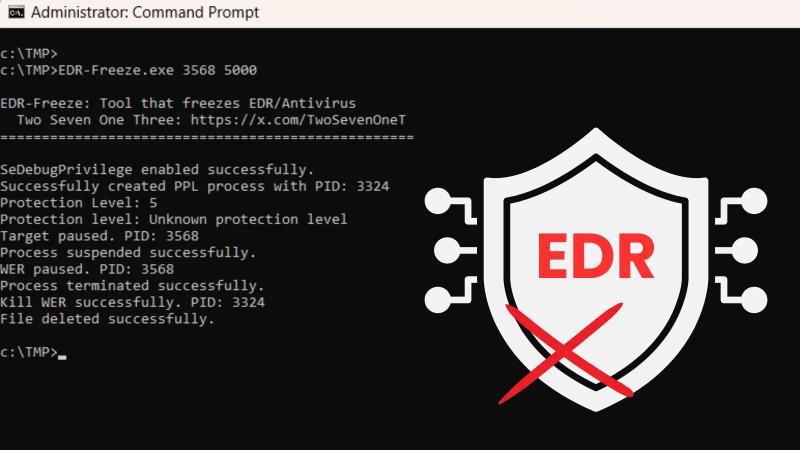
Windows offers a mechanism to create dumps (snapshots) of a process for diagnostics when something fails. During that process, Windows temporarily pauses the program’s threads to capture the state consistently. EDR-Freeze takes advantage of that pause: it launches the dump process on the EDR/antivirus and, at the instant the target process is suspended, it also stops the process managing the dump. The result: the EDR is suspended and does not resume.
To achieve this, it uses legitimate system components (the Windows error reporting service), which is why the technique does not require exploiting kernel flaws or installing malicious drivers. (In technical terms: the PoC uses the Windows dump path and then suspends the process that performed the dump, leaving the target process “frozen”.)
What was tested and what results were seen:
In labs, it was possible to suspend processes such as Microsoft Defender (MsMpEng.exe) on Windows 11. The process remained visible on the system but was not performing work or detecting activity. Monitoring tools show the process as “stopped” —no CPU, no active threads— even though the process has not disappeared. The PoC was published for research and defensive testing, so response teams can already reproduce it in controlled environments.
Important limitations
The technique relies on stopping the dump management process at exactly the right moment; if synchronization fails, the EDR resumes and the attempt fails. It does not exploit vulnerabilities, but is rather an abuse of legitimate system features, which is why signature-based blocking is not a reliable protection. Some environments limit how dumps are invoked or have controls that prevent this flow; additionally, certain internal monitoring mechanisms (watchdogs) can detect and recover suspended processes. Vendors such as Microsoft have indicated that their products are not affected on the endpoint, and that abuse attempts should be blocked; however, not all details are public.
Practical signals to detect an attempt
- Unusual executions of the Windows error reporting service (WerFaultSecure.exe) or dump processes targeting security processes.
- Access logs showing attempts to suspend/resume critical processes. (Sysmon or EDR telemetry can log this access.)
- Security processes in a “suspended” state without an apparent reason.
- Rapid creation/deletion of temporary files associated with dumps.
Mitigation and solution:
Based on the available analyses, here are some suggested strategies to mitigate the risk of EDR-Freeze:
- Monitor WerFaultSecure.exe execution with special attention to parameters: any invocation with /pid pointing to security processes should be considered suspicious.
- Restrict permissions to the WER component (Windows Error Reporting), for example by limiting who can invoke it and with which parameters, especially on critical hosts.
- Correlate process suspend/resume access events (PROCESS_SUSPEND_RESUME) on security processes, with alerts if it is not legitimate.
- Process integrity protection (whitelisting / blocking state changes) for security processes, so that they cannot be suspended by unauthorized processes.
- Advanced telemetry instrumentation: log in detail process suspension, dump, and resumption operations, and have alerts near the “abuse threshold”.
- System updates / patches: although this technique does not depend on a traditional vulnerability, future versions of Windows could strengthen WerFaultSecure or the dumping APIs to prevent abuse.
- Deception defenses / internal honeypots: trick the attacker into running EDR-Freeze on a decoy process and detect their activity.
- Internal adversary testing / red teaming: use EDR-Freeze as a test (in controlled environments) to assess whether the defensive infrastructure can detect and respond.
Additional information:
- https://www.bleepingcomputer.com/news/security/new-edr-freeze-tool-uses-windows-wer-to-suspend-security-software/
- https://cyberpress.org/edr-freeze-tool-disables/
- https://binarydefense.com/resources/blog/dont-freeze-me-out-bro-arc-labs-technical-analysis-of-edr-freeze
- https://www.morphisec.com/blog/edr-freeze-attack-freezes-security-tool/